
They have the broken part. Not the product number.
DIY customers arrive with a photo of a hinge, a tap or a tile and no idea what it is called. Every project needs more than one product, and fittings come in series. Koral finds the part from the photo and builds what belongs with it from your feed.
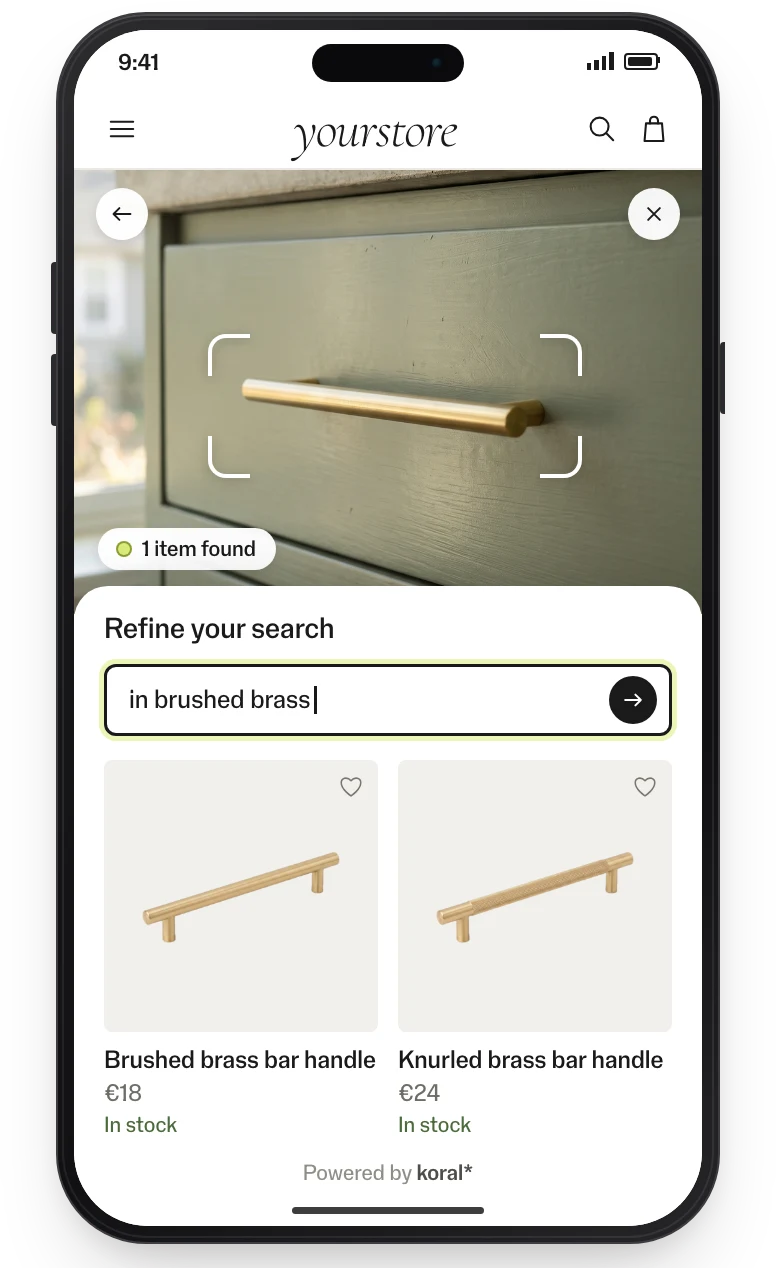
From a photo of the part to the finished job.
-
They can’t name the part they need.
01 / 04Image searchA photo of the hinge, handle or tap finds the closest matches in your range. The customer draws around the part, and words narrow it down: “in brass”.
- Search bar
- Product page
- Assistant
-
The project needs more than the product.
02 / 04Complementary productsThe parts and accessories that belong with each product, such as bits for a drill, on the product page, after add to basket and in the basket.
- Product page
- Added-to-basket step
- Basket
-
Handles, switches and taps come in series.
03 / 04Matching setsEvery piece of a design series shown on every other piece, with a set for each finish and colour.
- Product page
-
Technical titles hide products that look the same.
04 / 04See similarSee similar matches on what the product looks like, read from the images, so alternatives turn up whatever the title says.
- Listing page
- Product page
Measured on live sites.
Conversion in sessions that used visual discovery, 5× the site average of 1.6%.
Higher conversion than the site’s other product carousels.
More add-to-carts for shoppers who saw a matching set.
More sales from the baskets those sets created.
From the clients’ own analytics, A/B-split where possible.
Implementation: this is all it takes.
No model to train, no tagging, no CMS work. The product feed is the only input; the rest is a tag or an endpoint.
Feed connected
CSV, JSON or your platform feed. Koral indexes every image, in any language and any category.
Tag or endpoint wired
Add the tag through GTM, or call the endpoints from your own components. Your design, your markets.
Live and measured
Pilot on one category, A/B-split, with events in your analytics. Then roll out market by market.
99.9% uptime SLA. The script is served from a global CDN; requests are processed in the EU. Koral keeps nothing from shoppers: photos and data are used for the request and not stored. A data processing agreement (DPA) comes with every contract.
Frequently asked questions.
Yes. The same engine serves web and app, so a photo works wherever the customer is.
Yes. The rules engine covers categories, price bands, stock, margins and brand exclusions, and merchandisers review every set in the dashboard.
No. Koral reads your product images and feed as they are, with no tagging and no model to train.